Choosing how to integrate a rewards program is one of the biggest decisions our distribution partners make. It impacts how fast they can launch, how much they have to maintain, and how much of the experience they design themselves.
And every partner approaches it differently.
Some teams have large engineering orgs and the design resources to refine every single detail. Others would rather plug in a prebuilt UI to get their rewards program up and running quickly, particularly if they have a leaner team. Across the board, a growing number of our distribution partners are using AI tools to make tweaks and updates, and expect integration tooling to support that workflow.
Which is why we built three different integration paths — direct API (with llms.txt), server-side SDKs, and our own hosted UI (WebView) — each around a different set of priorities: control, ongoing ownership, and speed.
These paths aren’t mutually exclusive, either. They share the same API backbone and product functionality, so partners aren’t locked into a single path. Whether they pick one or combine several, cardholders will get the same full-featured, high-quality rewards experience they are looking for.
Below, we explain how these options work so you can determine which one (or combination) is a good fit for your team.
3 integration paths, 1 underlying API
As we previewed up top, all three integration paths run on the same Extended API component model, which delivers per-user, pre-computed display data (shortDescription, longDescription, cta, tags, detailTags, baseReward).
The upside of this shared foundation is that every new dynamic offer format we’ve rolled out, like tap-to-boost and tap-to-activate, and every new rewards experience we build going forward — will reach your users automatically, just in different ways:
- Direct API partners receive new behaviors through the components object. Plus, AI-assisted teams won’t need to rewrite any prompts. New offer formats will just flow through the llms.txt.
- SDK partners also receive new behaviors through the components object.
- WebView partners get new formats as soon as we launch them.
Each path has its own strengths depending on how your team likes (or has to) build. If you’re short on time, here’s a quick look at how they compare:
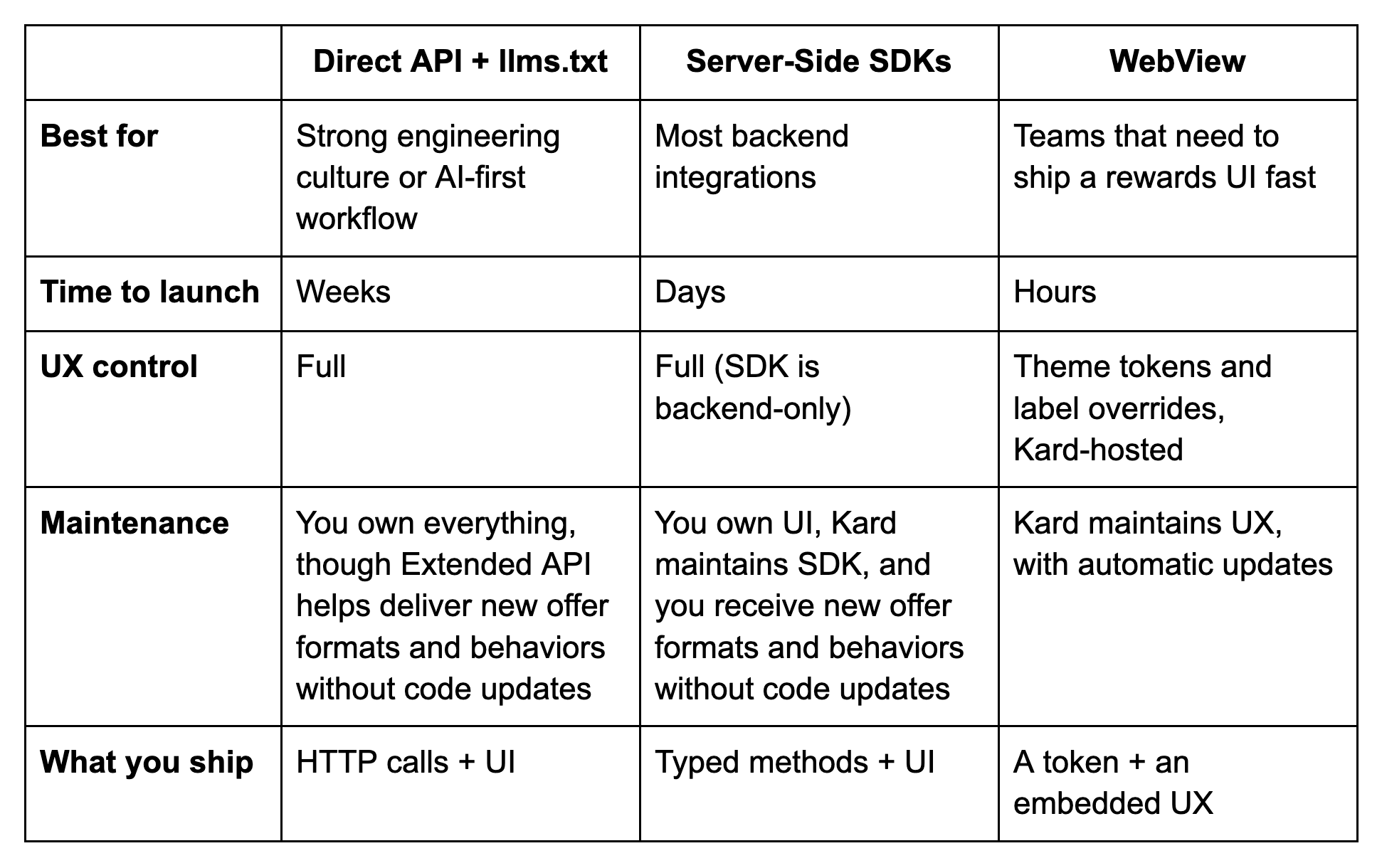
Path 1: Direct API + AI-assisted development
Our API has always been the most flexible way to build with Kard. And because we’ve structured it (and the Extended API component model on top of it) to be legible to AI coding tools, building and maintaining a direct integration is now meaningfully faster.
Point Claude Code, Cursor, Copilot, or ChatGPT to llms-full.txt, and your assistant can pull endpoints, schemas, auth flows straight from our API docs. Describe what you want to update, change, or build, and your assistant generates working integration code to spec.
Partners on this path have full ownership of refresh, retries, typing, and version migrations, with no SDK sitting between their code and our API.
Best fit for: Partners who need maximum flexibility in terms of their stack, their tooling, and pace.
Path 2: Official server-side SDKs
If you’d rather not write the HTTP layer yourself, our server-side SDKs handle it for you. A single package install (in TypeScript, Python, or Java) replaces hundreds of lines of custom code and eliminates a whole class of OAuth, retry, and timeout bugs.
Semantic versioning keeps you current with our API. When we add new endpoints or fields, you pick them up by updating to the latest version of our SDK.
Plus, our SDKs are backend-only, so the front-facing UI is still yours to design. Or you can hand that off too, with WebView (more on that next). Setup is as simple as:
- Add the Kard SDK to your project – TypeScript, Python, Java, Go, or .NET.
- Authenticate with client credentials (env vars supported).
- Call typed methods – fully type-safe and always in sync with our API.
Best fit for: Teams who want to customize their rewards experience UIs but don’t have the resources or time to build the foundation from scratch.
Path 3: Kard WebView
Our hosted WebView is the fastest path from zero to a production-ready rewards experience. You get a polished UI out of the box, complete with offer browsing, search, merchant category views, nearby offers, and a map view — all themed to your brand.
Our theme tokens cover brand colors, typography, and key headings. WebView also inherits the width of its container, adapting to whatever shell you embed it in.
Setup takes two steps:
- Generate a token. Call our auth endpoint with your organization ID and the user’s ID, and we’ll return a short-lived OAuth token scoped to that user.
- Pass that token to WebView and embed the WebView component: native on iOS/Android/React Native, or an iFrame on the web.
Every cardholder gets a personalized rewards experience, and every new feature we deploy (including new dynamic offer formats) will appear to users automatically.
→ See a demo of WebView here.
Best fit for: Teams who want a polished rewards experience live in days.
What path should you take?
There’s no “right way” to integrate with Kard. In fact, we’ve designed these models to be complementary. And we’re starting to see partners mix and match. For example, they:
Use WebView for the rewards tab and the API or SDKs for everything else. Think: user enrollment, transaction ingestion, attribution events, and custom surfaces like card detail pages.
Use SDKs on the backend and direct API on the frontend, offering greater reliability and full creative control over their brand.
Use the direct API and llms.txt for prototyping, and SDKs for production. AI-assisted code can help flesh out what they really want, and then SDKs keep the integration stable as the API evolves.
Not sure where to start? Try WebView first. You’ll get the rewards UX surface you need to go to market with your rewards program in hours. You can always add more capabilities as you grow.
Start building now
Here’s all the info you need to get started:
Need some guidance? Book a call with us.