
A rewards program is only as good as the end user experience. The problem is, APIs don’t deliver experiences. They return raw data: reward types, cashback values, terms, and dates.
And making that data feel intuitive (and engaging) to someone who just wants cash back on groceries or gas takes engineering work:
- Formatting rewards into display strings
- Writing conditional logic for different offer formats
- Figuring out how to communicate “boost this offer” versus “you’ve already boosted”
It doesn’t stop there. New offer formats designed to drive engagement, like progressive offers, purchase counts, spend tiers, and CTAs, require another round of custom UI work that has to be scoped and prioritized alongside everything else on your roadmap.
To cut that overhead and help you deliver an exceptional experience, we built the Extended API, which delivers pre-computed, per-user UI components alongside your existing offer data.
What’s in Extended API?
Kard’s Extended API includes dynamic offer design components like:
- Descriptions
- Call-to-action buttons
- Tags
- Formatted rewards
With all that out of the box, you don’t have to interpret raw offer data or build custom state logic for every new offer feature. You can use the time you would’ve spent doing that building richer offer experiences for your customers.
5 Reasons to use Kard’s Extended API
1. It tells you what to display
Instead of interpreting raw fields, you tell Kard which UI components your app supports, and the API returns the right data for each offer.
Components include:
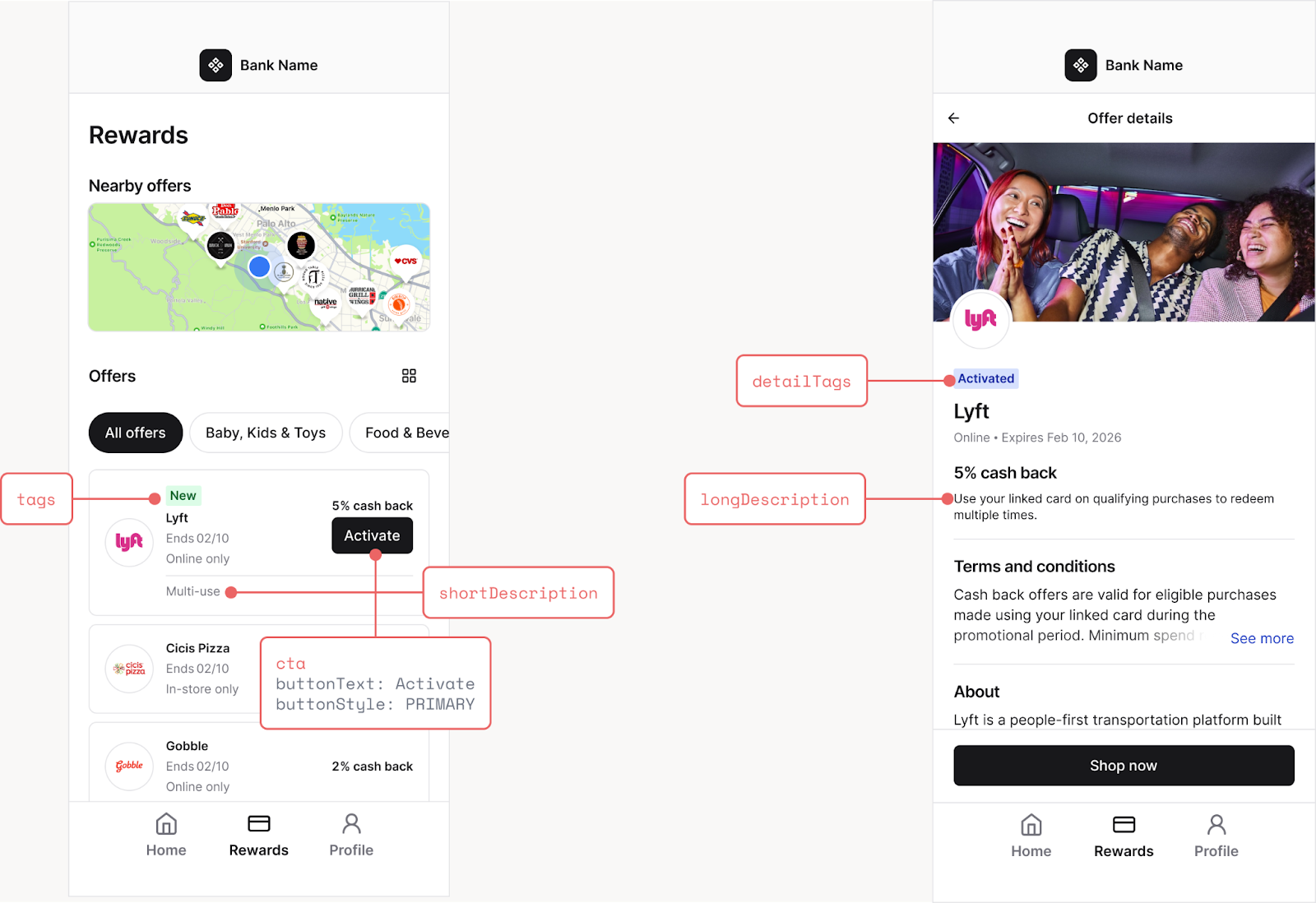
- shortDescription, a brief, dynamic description for offer list views, so you’re not writing display logic for every offer state yourself. For example, “multi-use” or “single-use.”
- longDescription, a detailed description with offer exclusions for detail pages. For example, “Use your linked card on qualifying purchases to redeem cash back multiple times.”
- cta, a call-to-action button with text, style, and an action URL so you know what to show and what should happen when it’s clicked. For example, “Tap to boost.”
- tags / detailTags, contextual labels for browse and detail views, so you don’t have to compute the offer state to figure out what label to surface. For example, “New,” “Activated,” or “5 days left.”
- baseReward, a formatted reward string ready for display so you don’t have to parse something like {“type”: “PERCENT”, “value”: 4}. For example, “4% cash back.”
2. It handles every dynamic offer format
Extended API is built to handle every new dynamic offer format Kard introduces, which means they go live as soon as they launch. No UI rebuilds necessary.
That’s true if you’re on an AI-assisted development path, too. Since new offer types flow through the same components object, any AI tool trained on your integration code will pick them up automatically — it’s the same structure, just new values.
3. You don’t lose control over your UI
Our Extended API defines the “what,” not the “how.” Your design decisions are entirely yours.
- shortDescription and longDescription provide meaningful context, but you choose where and how they appear in your interface.
- cta gives you button text, style, and an action URL, but you still design and render the button however you want.
- tags are string arrays, but you decide whether they’re rendered as pills, badges, overlays, or any other format that fits your experience.
In short, we supply the structure and you shape the experience.
4. Multiple ways to adopt
You don’t have to use all components at once. Extended API is designed for incremental adoption. Choose from:
- Full components (the complete experience): Get interactive buttons, contextual tags, dynamic descriptions, and formatted rewards through shortDescription, longDescription, cta, tags, detailTags, and baseReward.
- Description and CTA buttons: Get dynamic descriptions with actionable buttons through shortDescription, longDescription, and cta. We recommend this for apps that can render buttons but not badge or tag overlays.
- Description-only: Get dynamic descriptions without interactive elements using shortDescription and longDescription. Go this route if your app can’t render buttons or tags.
Note: If you’ve seen WebView, you’ve already gotten a taste of Extended API with full components. The dynamic descriptions, tags, and activation buttons in WebView are powered by the same components model documented here.
5. It’s built for AI-first developer teams
Because the Extended API component model is well-structured, it’s highly legible to AI coding tools. Devs can point to Claude Code, Cursor, GitHub Copilot, or any LLM-powered tool at docs.getkard.com/llms.txt, and those tools can look up endpoints, schemas, and the Extended API component model.
Rather than CTRL+F-ing in docs to find what you need, you can describe what you are looking to do in natural language and start generating working integration code.
For teams who want full control over their HTTP calls, request shaping, and error handling, Extended API offers the best of both worlds: complete API flexibility with an AI assistant to help you integrate and build out your program faster.
How to get started with Extended API
Add supportedComponents to your existing offer requests. It’s that easy.
For further reading, check out:
- Our Extended API integration guide
- Our WebView Docs, to see how we leverage the Extended API in our drop-in component
llms.txt / llms-full.txt for AI-assisted integration.
.png)

